
Choose the WordPress block editor when its native content tools and your theme’s site-editing capabilities meet the project’s needs. Consider Elementor when its visual workflow and specific design controls justify the additional plugin, licensing, and maintenance considerations. The right choice depends on the website you will maintain, not on an editor’s reputation alone.
This WordPress block editor vs Elementor comparison focuses on practical project decisions. It does not claim a universal performance winner or repeat price figures that may change. Instead, it gives you a way to compare equivalent pages, editing tasks, and long-term responsibilities.
Understand what you are comparing
The WordPress block editor is the native environment for composing content with blocks. A compatible block theme extends block-based editing to shared site structure through the Site Editor. A classic theme can use the block editor for page content while retaining a different layout workflow.
Elementor is a separate visual editing system delivered through a plugin. Its available features depend on the installed version, plan, and extensions. The Elementor Theme Builder documentation describes site-wide design capabilities, but confirm your required features against the current plan before purchase.
This distinction matters because “Gutenberg versus Elementor” can mix content editing, theme editing, and commercial feature packages in one sentence. Compare the actual combination you would use for the project.
Compare the everyday workflow
| Question | Block editor approach | Elementor approach |
|---|---|---|
| How is content assembled? | Blocks, patterns, and theme defaults | Its visual containers, widgets, and templates |
| Who controls shared structure? | Theme capabilities and Site Editor where supported | Theme plus applicable Elementor capabilities |
| What needs maintenance? | WordPress, theme, and chosen extensions | Those components plus Elementor and its dependencies |
| How should speed be compared? | Equivalent finished pages | Equivalent finished pages |
| What determines cost? | Theme, extensions, hosting, support, labor | Those costs plus any required Elementor licensing |
Give each option the same brief. If one version includes a popup, animation package, and multiple embeds while the other is plain text, the comparison measures different websites rather than different implementations of the same requirement.
When the block editor may fit better
Start with the native editor for content-driven sites whose layouts can be expressed comfortably with the available blocks and patterns. A business publishing articles, service pages, and case studies may value a consistent editing experience and a restrained component library.
A carefully configured block theme can let editors reuse approved sections without making every page a separate design exercise. This can simplify training when the team is willing to work within shared defaults and a limited set of layout choices.
However, native does not automatically mean simple. A site with several overlapping block plugins, custom fields, and many template variations can require substantial training. Evaluate the finished editorial experience rather than the empty editor.
When Elementor may fit better
Consider Elementor when a team already works effectively with it or when a verified feature meaningfully reduces the project’s build and maintenance effort. A designer may prefer its controls for a particular layout, campaign workflow, or responsive adjustment.
Use the product’s own documentation to confirm the required behavior. For example, responsive editing has specific controls and version-dependent details. Test the exact installed version and avoid assuming every tutorial represents your interface.
The benefit should be concrete: fewer steps to build the approved layout, easier client updates, or an integration you have validated. “More features” is not a useful advantage if those features increase complexity without helping the website.
Design freedom and consistency
More granular controls can be helpful for a specialist design, but they also create more decisions. If every editor sets independent colors, margins, and type sizes, the website can become inconsistent regardless of the tool.
Before choosing either approach, create a small design system: heading rules, button styles, spacing choices, image proportions, and reusable sections. Ask how the editor supports those decisions and how easy it is to make exceptions accidentally.
For a business with multiple authors, consistency may matter more than unrestricted control. For a design-led campaign, selective granular control may justify additional training. Write down which requirement applies to your project.
Performance: test the implementation
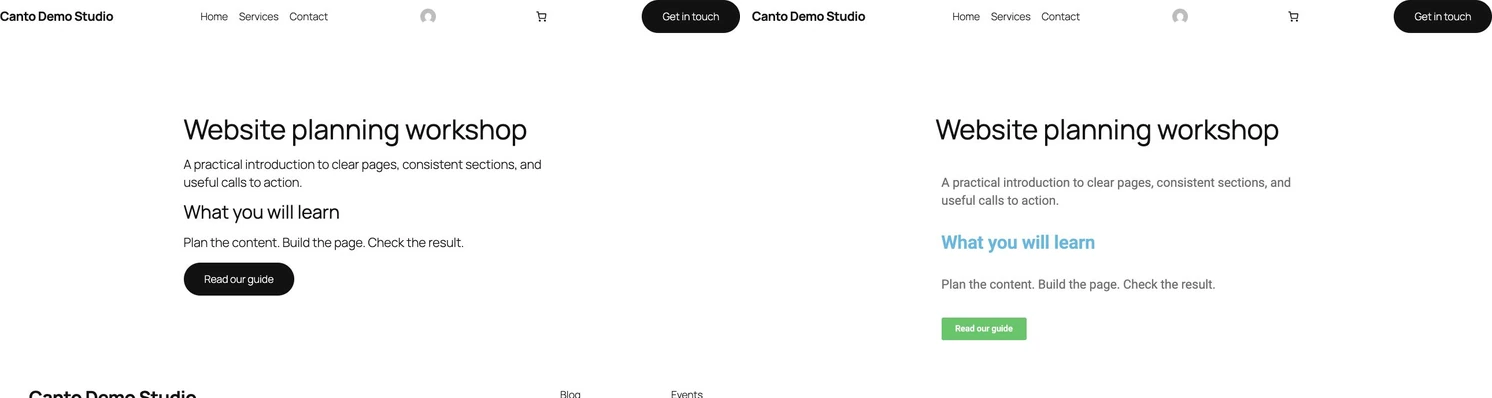
Build an equivalent representative page in both systems. Use the same images, copy, hosting, third-party services, and visible components. Include any extensions needed to achieve the required result.
Test several loads under consistent conditions. Inspect downloaded assets, layout movement, and interaction responsiveness rather than comparing only one headline score. Record whether the tests are cached and whether you are logged in.
Do not publish a performance claim based on an empty page or a vendor demo with unknown hosting. If speed is a deciding factor, collect your own evidence for the actual project.
Count the full cost
List required commercial licenses, renewals, hosting, training, and support. For Elementor, verify the plan supporting your intended features and number of sites. For the block editor, include paid themes or extensions if the design depends on them.
Also estimate labor. A tool with a higher subscription cost can still make sense if a trained team maintains it efficiently. A free setup can become expensive if every ordinary change requires specialist help.
Ask who will own the licenses and what happens if a subscription ends. Distinguish loss of updates or support from the behavior of already installed components, and verify the current terms directly with the provider.
Think about migration and content portability
Test deactivation on a disposable copy. Inspect what remains visible, what remains editable, and what needs rebuilding. Do not assume that removing an editor will reproduce its layouts in another system.
Separate long-lived business data from decorative layout choices where possible. Record custom templates, dynamic connections, and extensions. The more the site relies on proprietary widgets or undocumented custom behavior, the more carefully a future migration needs planning.
If you already have a working website, ask whether changing editors solves a real problem. Moving every page just to follow a trend can consume time better spent improving content, performance, or the main visitor journey.
Run a realistic client handoff test
Give the future maintainer a few common tasks without coaching: change a service paragraph, add a team member, replace a photograph, update a call to action, and preview the mobile page. Observe both speed and mistakes.
Then test a global task, such as changing the primary button style. Can the maintainer understand its scope? Can they recover from an unwanted change? Write a short handoff guide and check whether the tool’s workflow makes sense to them.
- Build one representative page in each candidate setup.
- Check the required integrations and responsive behavior.
- Compare maintenance and licensing costs.
- Measure equivalent pages fairly.
- Test common edits with the actual maintainer.
- Document the decision and its tradeoffs.
If you are still deciding on the platform itself, our WordPress versus website builders comparison addresses that broader choice before you select an editing system.
Frequently asked questions
Is Gutenberg the same as the Site Editor?
The term Gutenberg is often used loosely for block editing. Page and post content editing and whole-site editing have related tools but different responsibilities. Check your theme’s capabilities.
Can I use both editors on one website?
It is possible to use different systems for different content, but decide ownership clearly. Avoid letting two systems compete for the same header, template, or styling responsibility.
Which is better for SEO?
Evaluate the resulting page: useful visible content, sound navigation, appropriate metadata, usable mobile layouts, and reliable performance. An editor name alone does not establish search quality.
Choose the system that delivers the required website with a workflow your team can maintain. A small practical trial will reveal more than a generic feature comparison.
Leave a Reply