

WordPress patterns are reusable arrangements of blocks, templates define the structure of a page type, and template parts hold shared structural sections such as headers and footers. A synced pattern adds another behavior: its shared content updates wherever the pattern is used. Understanding these differences helps you change the right thing without accidentally redesigning unrelated pages.
If you have ever edited a layout and wondered why other pages changed, the distinction between WordPress patterns vs templates is probably involved. This guide uses a fictional service business to show where each feature belongs and how to choose a sensible editing scope.
The short comparison
| Feature | Best starting purpose | Example | What to check before editing |
|---|---|---|---|
| Page content | Information specific to one page | A service description | Which page you opened |
| Unsynced pattern | A reusable starting layout | A three-column benefits section | Each inserted copy is independent |
| Synced pattern | Repeated shared content | A company-wide contact callout | Other uses can change too |
| Template | Structure for a page or content type | The layout of individual blog posts | Which pages use that template |
| Template part | A shared structural section | Header or footer | Which templates reference that part |
The official WordPress comparison distinguishes content reuse from shared site structure. Use that distinction first, then decide how much synchronization you need.
What is a WordPress pattern?
A pattern gives you a collection of blocks that already work together. For example, a benefits pattern could contain a heading, an introduction, and three Groups, each with an icon, title, and paragraph. Instead of rebuilding the arrangement each time, you insert it and adapt the content.
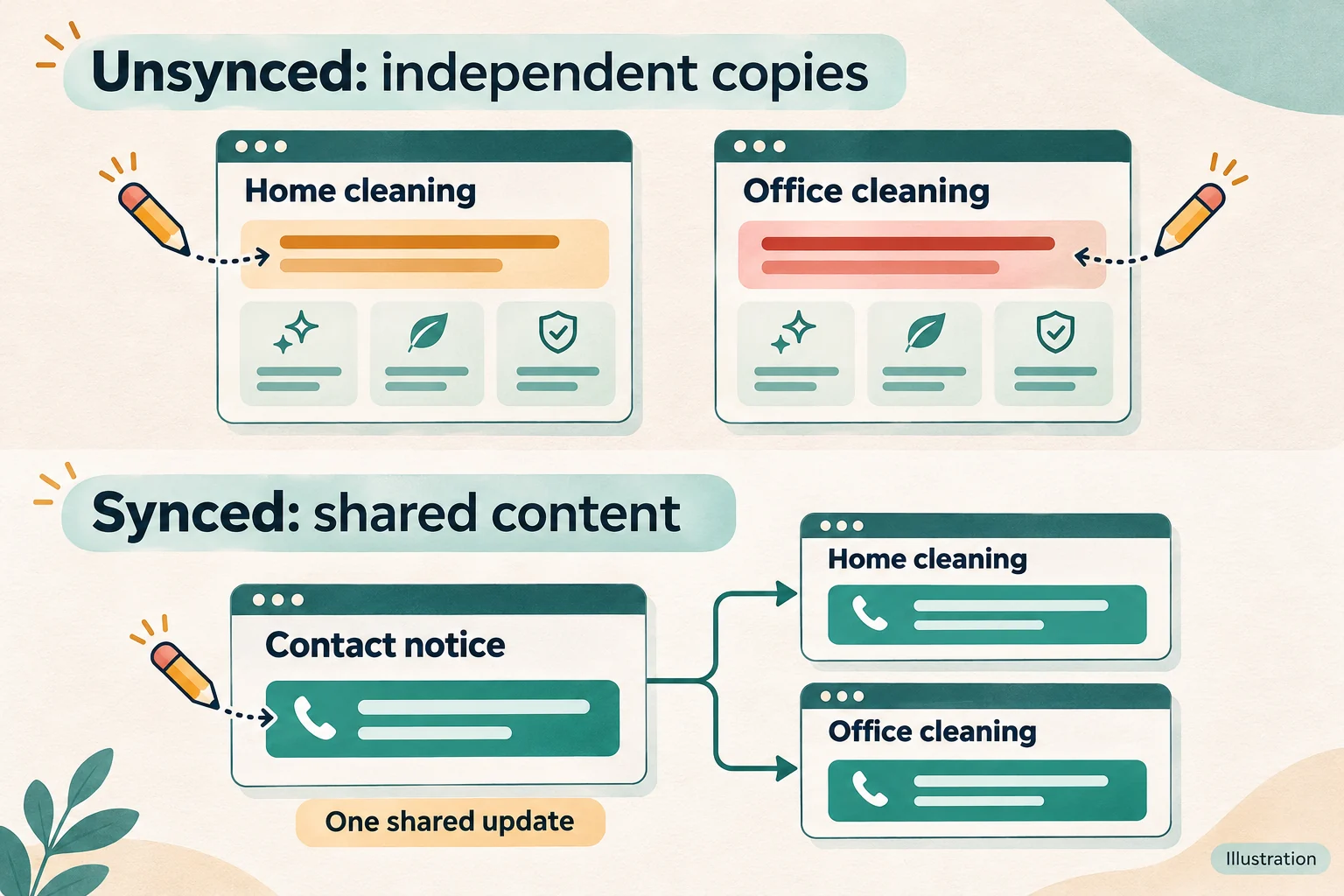
For an unsynced pattern, the inserted blocks become an independent copy. Changing the second service page’s wording does not rewrite the first page’s wording. This makes unsynced patterns useful when a layout repeats but the information varies.
Imagine a cleaning company with pages for home cleaning, office cleaning, and end-of-tenancy cleaning. Each page can start with the same benefits pattern while describing different services. The repeated visual structure helps visitors scan the pages without forcing all three to share identical text.
What makes a synced pattern different?
A synced pattern keeps a shared relationship between its uses. It suits information that should remain consistent, such as a standard booking notice or a company-wide enquiry callout. Edit the shared pattern and its uses can reflect that change.
Before editing a synced pattern, ask whether every location should receive the new content. A seasonal promotion inserted across twenty articles might need a shared update; a service-specific offer probably should not replace every other offer.
Supported pattern overrides offer a more selective option for some blocks: shared design with editable content fields. Availability depends on the block and WordPress setup. Do not assume that every property in every block can be overridden. Test the fields you need in a small example before adopting the system across your site.
What is a WordPress template?
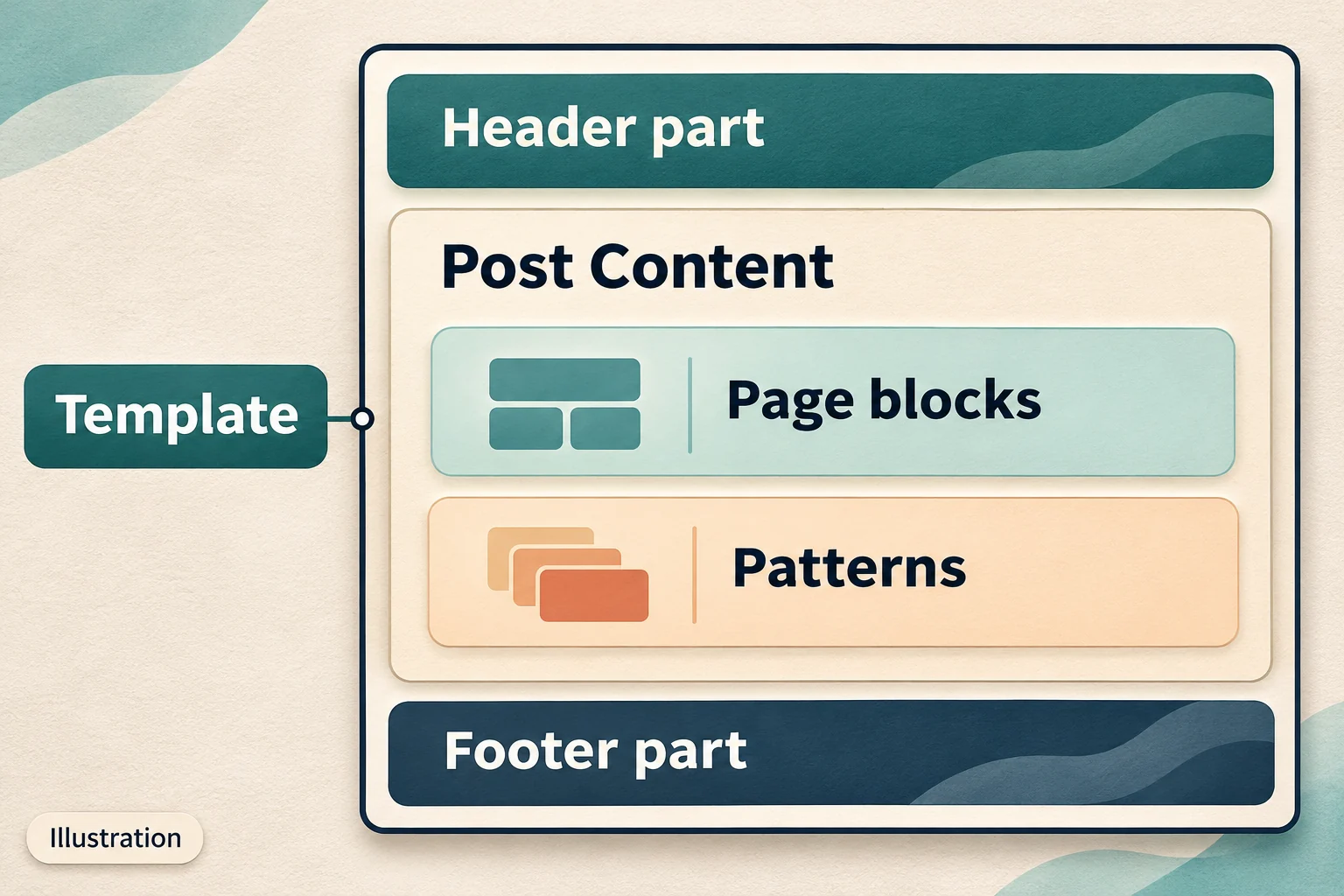
A template controls a broader page structure. A single-post template might include a header, post title, featured image, Post Content block, author area, and footer. The Post Content block is the place where the individual article’s body appears.
The WordPress template introduction explains this structural role. For editors, the practical question is whether you want to change the page’s unique content or the arrangement surrounding it.
Suppose every article needs a smaller title area. That is a template-level design decision. Suppose one article needs an extra troubleshooting section. That belongs in the article itself. Mixing these tasks can accidentally place one article’s words into a layout used by every article.
A dedicated custom template can serve a special page, such as a landing page with a simplified header. Name it by purpose so another editor can identify its role without opening several similar files.
What is a template part?
A template part is a shared section used inside templates. Headers and footers are common examples. Using a shared part means you can maintain one navigation area instead of recreating it separately in every template.
Consider a site with a default page template, a single-post template, and an archive template. If all three reference the same header part, editing that part affects the header in all three places. If the campaign template references a separate campaign header, it can remain different.
Choose template parts for structural responsibilities. A testimonial inside one service description normally does not need to become a structural template part. Starting with the simplest appropriate feature makes later editing easier to explain.
How pages, templates, and parts fit together
Follow one visitor request through a fictional service page. WordPress uses an applicable template. That template includes a header part, a page title area, a content area, and a footer part. The content area displays the service page’s own blocks, which may include sections created from patterns.
This layered view explains several common surprises. Editing the page’s benefit paragraph should affect that page. Editing its shared header affects the other templates using the header. Removing the Post Content block from the template can make the page body disappear from the rendered layout even though the content remains stored.
A decision process for everyday editing
- Decide whether the information belongs to one page or several.
- If it belongs to one page, edit that page’s content.
- If you want a reusable starting layout with independent text, use an unsynced pattern.
- If repeated content should update together, consider a synced pattern.
- If you are changing the structure around a class of content, edit its template.
- If you are changing shared structural content, edit its template part.
Before saving, state the intended scope in plain language: “Change the contact notice everywhere” or “Change only the office-cleaning page.” Compare that statement with the entity named in the editor’s save dialog. If they disagree, stop and inspect the selection.
Common mistakes and better alternatives
Putting unique page copy in a shared template. Keep the service description in the page and let the template display it through its content area. This preserves the relationship between page content and layout.
Using a synced pattern for unrelated offers. If each offer needs independent wording and design, start with an unsynced pattern. If only selected fields should differ, test supported overrides deliberately.
Editing a shared header for one campaign. Create a separate part and assign it through a dedicated template. Confirm that the normal pages still use the normal header.
Deleting a shared item without checking its uses. Review where it appears and replace those references first. Keep a backup before reorganizing a library of shared content.
Organize your reusable library
Use descriptive names such as “Contact — standard enquiry” or “Benefits — three columns.” Avoid names like “Pattern 4 copy final,” which reveal nothing about the intended purpose. Keep the library small enough that editors can find the correct component.
Document whether each shared item is safe to edit globally. For a growing team, write down who owns the header, promotional callouts, and important templates. A short ownership note can prevent a routine copy edit from turning into an unexpected site-wide change.
Review the library after major redesigns. Retire unused variations carefully and keep a record of which pages need migration. Reusable components are valuable when they reduce decisions; an unmanaged collection of near-duplicates does the opposite.
Frequently asked questions
Are reusable blocks the same as synced patterns?
Older tutorials may call them reusable blocks. WordPress renamed that interface, so look for synced patterns in current documentation and check the version used by a tutorial.
Can patterns be used inside templates?
Yes. A pattern can help assemble a layout, while the template retains responsibility for the overall structure. Keep the purpose of each layer clear.
Why did editing one page change another?
Check whether you edited a template, a shared template part, or a synced pattern. Compare the references and restore the appropriate version before making a page-specific copy.
Start every change by deciding its scope. Once you know whether the change belongs to a page, a repeated content section, or shared structure, the appropriate WordPress feature becomes much easier to choose.
Leave a Reply