

WordPress SEO starts with making useful pages accessible, understandable, and worth choosing. An SEO plugin helps manage some settings, but it does not replace content quality, a working website, or verification.
This guide follows the setup order for a small website. For an established site, inspect existing settings before changing URLs or indexing behavior.
Check that the public site can be indexed
Open Settings → Reading and inspect search-engine visibility. A production site intended for search should not accidentally retain a staging indexing restriction.
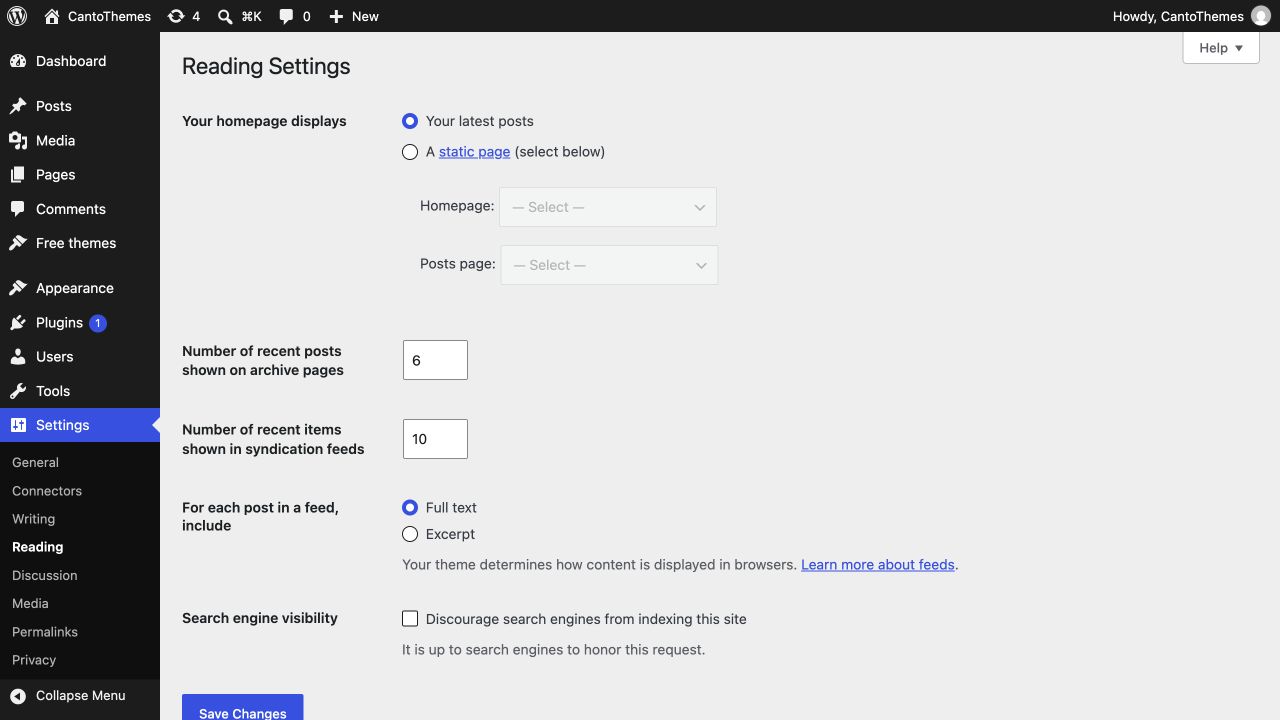
This actual local WordPress screenshot shows the control. Unchecking it does not guarantee indexing, and checking it is not a security mechanism for private material.
Inspect the public page’s robots directives and any access protection. An SEO plugin, server header, or host setting can affect indexability separately.
Keep staging protected and separate. Do not remove development restrictions from the wrong environment.
Use a stable, descriptive URL structure
Choose clear URLs for new pages. A short slug describing the subject is easier to maintain than a long string of repeated keywords.
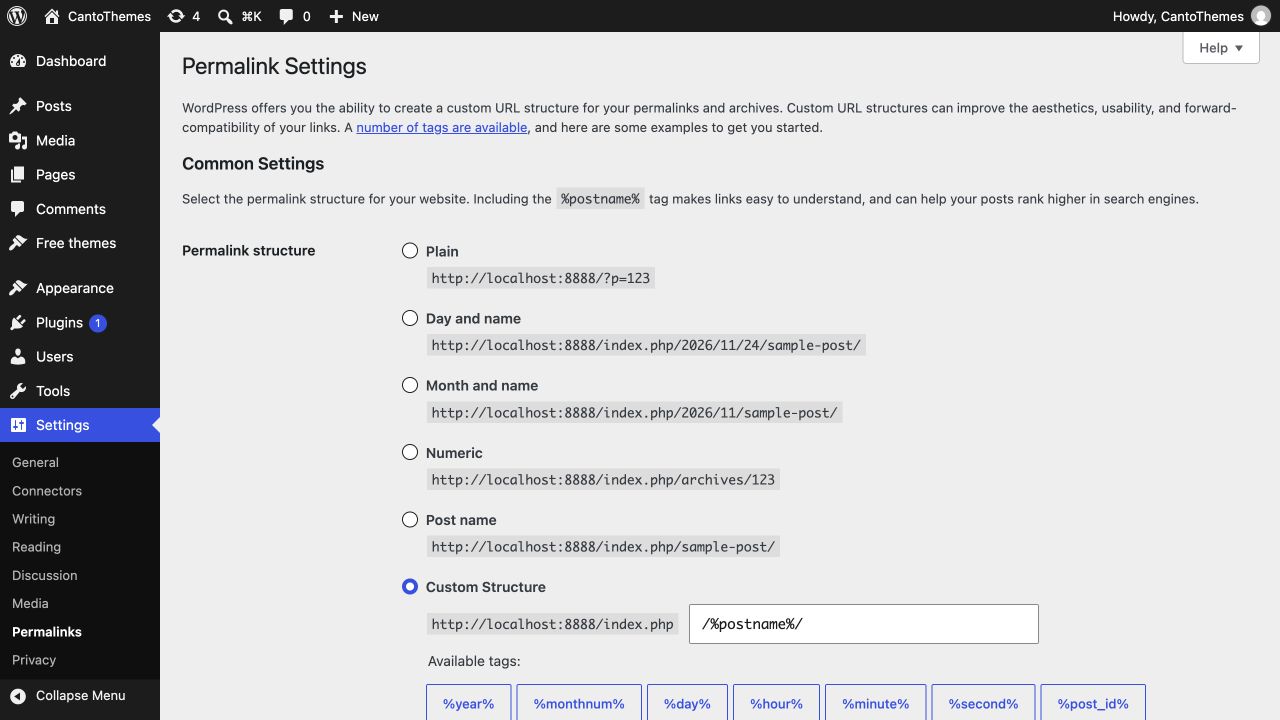
The actual local Permalink Settings screen illustrates the available controls. Do not change an established structure casually: existing links may need redirects and verification.
Keep the URL stable when updating an evergreen article unless there is a clear reason to change it. Updating a year in the title does not require adding that year to the URL.
Check HTTPS and the preferred hostname so internal links and canonical signals remain consistent.
Give each page a distinct purpose
Write the reader’s question and the outcome before drafting. A page about setting up a staging site should explain prerequisites, protection, testing, and deployment considerations.
Check whether another page already answers the same need. Updating one complete resource may be better than publishing overlapping versions.
Use the terms readers naturally use, but avoid a target keyword in every sentence. Include examples, specific instructions, and common failure cases that help someone complete the task.
Do not invent personal testing, customer results, or product experience. Label hypothetical examples and document actual observations.
Organize the article for reading
Use a clear page title and logical section headings. Many themes already display the title as H1; article sections can then use H2 and appropriate subsections.
Answer the main question early, then develop the procedure. Put prerequisites before the steps that depend on them.
Use lists for sequential or parallel information, descriptive links for useful destinations, and images where they explain the subject.
A fixed word count is not a ranking requirement. Write enough to answer the question fully and remove material that merely repeats it.
Configure titles and descriptions deliberately
Use one SEO plugin to manage overlapping metadata responsibilities unless you have a deliberate, compatible arrangement.
Set sensible defaults for post types, then write a specific title and description for important individual pages.
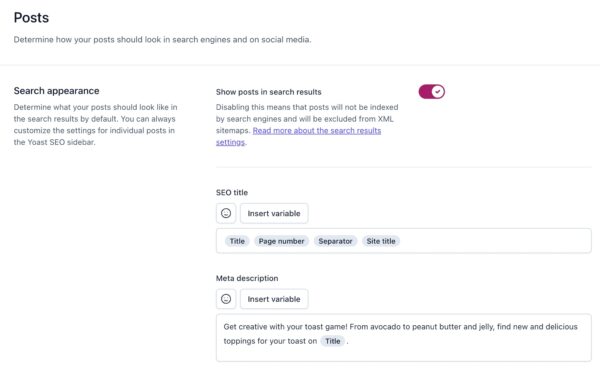
This official Yoast screenshot shows post-type search-appearance defaults, not the settings of this website. Individual article overrides are handled separately.
Keep titles descriptive and avoid promises the content cannot fulfill. Use a concise description that summarizes the page’s value rather than a list of keywords.
Google can generate different title links or snippets. The configured fields are inputs, not guaranteed search-result text.
Link pages in context
Make important pages reachable through navigation and relevant content links. Link a detailed service page from its summary and connect a prerequisite guide where the reader needs it.
Use anchor text that describes the destination. Check the link rather than assuming an imported button points to the right page.
Avoid adding unrelated “related posts” sections simply to increase link count. A contextual link should support the current task.
Maintain useful category archives without creating a new tag for every keyword variation.
Verify the sitemap and Search Console setup
Use the sitemap produced by WordPress or your chosen SEO setup and inspect the actual output. Avoid guessing its location or enabling conflicting generators.
Verify the intended Search Console property through a supported ownership method. Submit the sitemap where appropriate and inspect a representative public page.
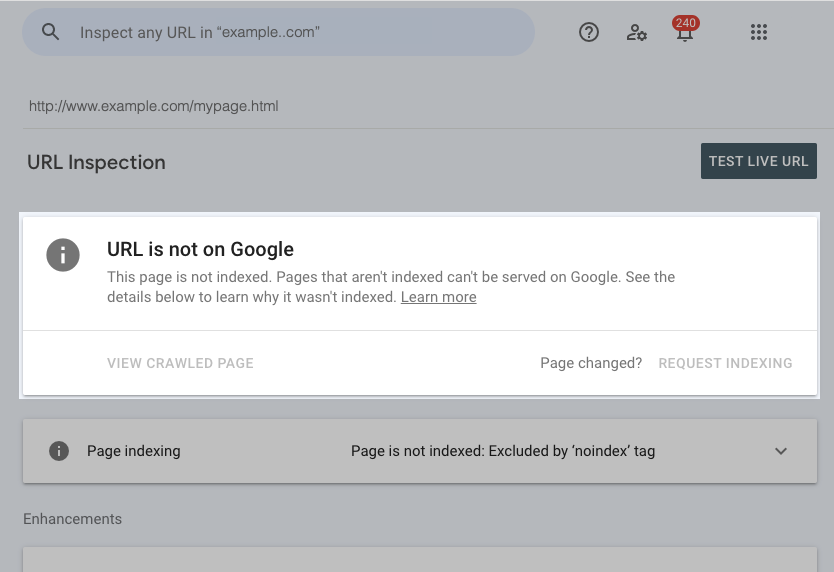
This official Google screenshot is an example report. It does not describe this website’s indexing status.
Review whether Google can access the page and which canonical URL it recognizes. A live test and the stored indexing report describe different states.
Open and submit the actual sitemap
For a Yoast installation, use Yoast SEO → Settings → Site features and find XML sitemaps. Open its sitemap-view control and copy the URL that actually loads. Menu groupings can differ by release; use the current Yoast sitemap instructions when labels differ.
- Open one child sitemap and inspect several expected public pages.
- Confirm that the entries use the production hostname and preferred URLs.
- In the verified Search Console property, open Sitemaps, submit that sitemap URL, and inspect the processing result later.
- Check an important public article with URL Inspection.
A draft is not expected to appear as an ordinary public sitemap entry. Submit after the intended pages are published through the normal review process; submitting a sitemap does not publish them or guarantee indexing.
Measure and maintain
Use Search Console to understand queries, pages, and indexing issues over time. Compare meaningful periods and keep a record of major changes.
Check forms, mobile navigation, images, and page performance alongside search data. Traffic is not useful if visitors cannot complete the intended action.
Google’s SEO Starter Guide provides a primary reference for the fundamentals. Build on those basics with accurate, specific content and ongoing maintenance rather than expecting a plugin score to secure rankings.
Example: set up SEO for a new repair-service page
A fictional repair workshop creates one page for brake servicing. The page should explain what the service covers, which bicycles it accepts, how assessment works, and what the customer should provide.
Choose a descriptive title and stable slug. Write the main answer and procedure before polishing the meta description. Do not create several copies that differ only by nearby town names.
Link to the page from the service overview and from genuinely relevant articles. Check that the enquiry action reaches a working form with an accurate confirmation.
Use a real service photograph or a clearly illustrative image, and write alt text according to its content. Add only business claims the owner has approved.
After publication through the normal review process, inspect the public response, canonical, sitemap inclusion where appropriate, and Search Console status. A successful plugin score is not the final check.
Keep the content under review when the service, pricing process, or interface changes. The useful SEO asset is the accurate destination and working customer journey.
Leave a Reply